LocalStorage
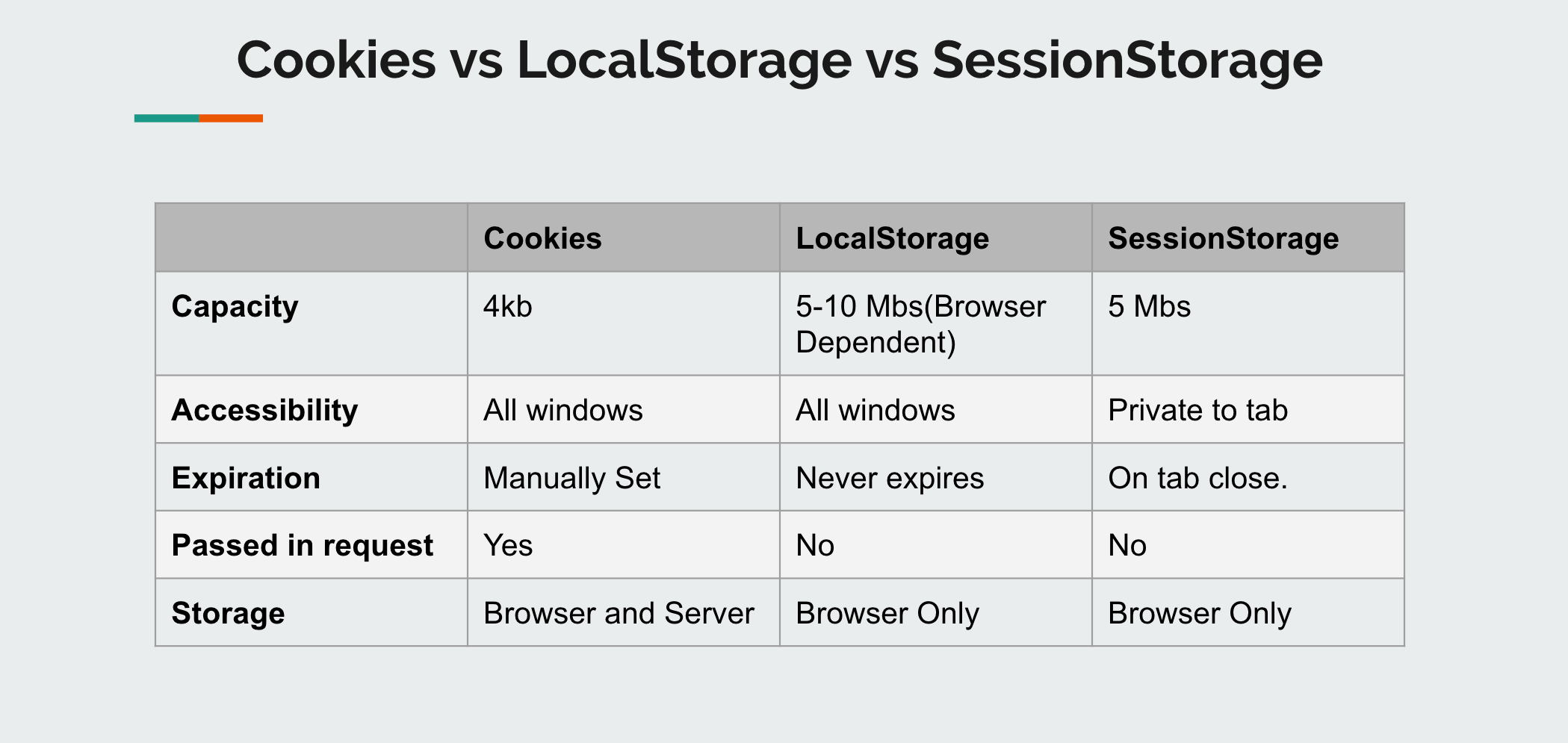
localStorage is a way to store data on the client’s computer. It allows the saving of key/value pairs in a web browser and it stores data with no expiration date. localStorage can only be accessed via JavaScript, and HTML5. However, the user has the ability to clear the browser data/cache to erase all localStorage data.
- stores data with no expiration date
- storage limit is about 5MB
- data is never transferred to the server
- plaintext, hence not secure by design
- limited to string data, hence need to be serialized
- can only be read on client-side
Session storage
- stores data only for a session, meaning that the data is stored until the browser (or tab) is closed data is never transferred to the server
- can only be read on client-side
- storage limit is about 5-10MB
- opening multiple tabs/windows with the same URL creates sessionStorage for each tab/window
Cookie
- Stores data that has to be sent back to the server with subsequent XHR requests. Its expiration varies based on the type and the expiration duration can be set from either server-side or client-side .
- Cookies are primarily for server-side reading (can also be read on client-side), localStorage and sessionStorage can only be read on client-side.
- Size must be less than 4KB.
- Cookies can be made secure by setting the httpOnly flag as true for that cookie. This prevents client-side access to that cookie.