CSS Layout
The position Property:
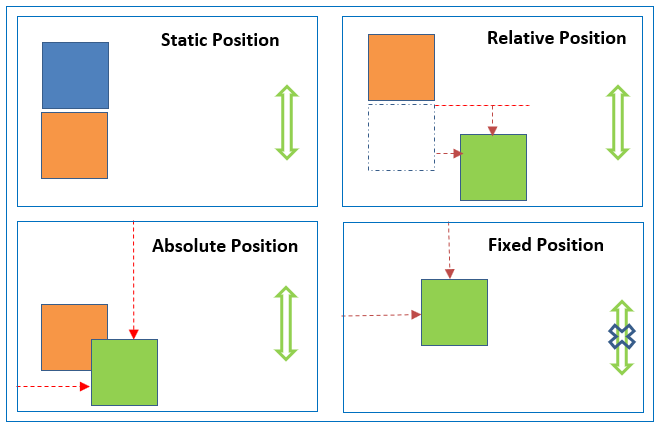
The position property specifies the type of positioning method used for an element (static, relative, fixed, absolute or sticky).
| nom | Position Property | Nots |
|---|---|---|
| 1. | static | HTML elements are positioned static by default, Static positioned elements are not affected by the top, bottom, left, and right properties. |
| 2. | relative | An element with position: relative; is positioned relative to its normal position. |
| 3. | fixed | An element with position: fixed; is positioned relative to the viewport, which means it always stays in the same place even if the page is scrolled. The top, right, bottom, and left properties are used to position the element, A fixed element does not leave a gap in the page where it would normally have been located. |
| 4. | absolute | An element with position: absolute; is positioned relative to the nearest positioned ancestor (instead of positioned relative to the viewport, like fixed), However; if an absolute positioned element has no positioned ancestors, it uses the document body, and moves along with page scrolling. |
| 5. | sticky | An element with position: sticky; is positioned based on the user’s scroll position. |
Example:
div {
  position: static;
  border: 3px solid #73AD21;
}
The z-index
When elements are positioned, they can overlap other elements.
The z-index property specifies the stack order of an element (which element should be placed in front of, or behind, the others).
Example:
div {
  z-index: 10;
}
Floating Elements
The float CSS property places an element on the left or right side of its container, allowing text and inline elements to wrap around it. The element is removed from the normal flow of the page, though still remaining a part of the flow (in contrast to absolute positioning).
Example:
    float: none;
    float: left;
    float: right;