Object-Oriented Programming, HTML Tables:
Domain Modeling:

In software engineering, a domain model is a conceptual model of the domain[definition needed] that incorporates both behaviour and data.[1][2] In ontology engineering, a domain model is a formal representation of a knowledge domain with concepts, roles, datatypes, individuals, and rules, typically grounded in a description logic.
Define a constructor and initialize properties:
To define the same properties between many objects, you’ll want to use a constructor function. Below is a table that summarizes a JavaScript representation of an EpicFailVideo object.
| Property | Data | Type |
|---|---|---|
| epicRating | 1 to 10 | Number |
| hasAnimals | true or false | Boolean |
EpicFailVideo example:
    var EpicFailVideo = function(epicRating, hasAnimals) {
    this.epicRating = epicRating;
    this.hasAnimals = hasAnimals;
    }

    var parkourFail = new EpicFailVideo(7, false);
    var corgiFail = new EpicFailVideo(4, true);

    console.log(parkourFail);
    console.log(corgiFail);
This is object-oriented programming in JavaScript at its most fundamental level.
- The new keyword instantiates (i.e. creates) an object.
- The constructor function initializes properties inside that object using the this variable.
- The object is stored in a variable for later use.
Generate random numbers
    var EpicFailVideo = function(epicRating, hasAnimals) {
    this.epicRating = epicRating;
    this.hasAnimals = hasAnimals;
    }

    EpicFailVideo.prototype.generateRandom = function(min, max) {
    return Math.floor(Math.random() * (max - min + 1)) + min;
    }

    var parkourFail = new EpicFailVideo(7, false);
    var corgiFail = new EpicFailVideo(4, true);

    console.log(parkourFail.generateRandom(1, 5));
    console.log(corgiFail.generateRandom(1, 5));
Domain modeling is the process of creating a conceptual model for a specific problem. And a domain model that’s articulated well can verify and validate your understanding of that problem.
Here’s some tips to follow when building your own domain models.
Model its attributes with a constructor function that defines and initializes properties.
Model its behaviors with small methods that focus on doing one job well.
Create instances using the new keyword followed by a call to a constructor function.
Store the newly created object in a variable so you can access its properties and methods from outside.
Use the this variable within methods so you can access the object’s properties and methods from inside.
HTML Tables:
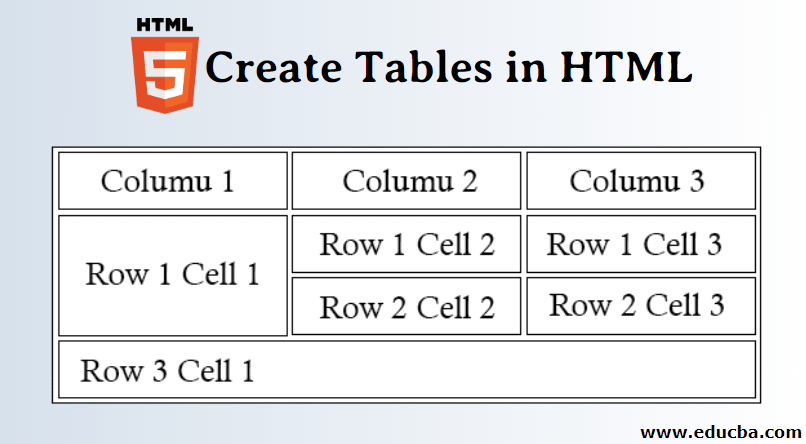
HTML tables allow web developers to arrange data into rows and columns.
The <table> tag defines an HTML table.
Each table row is defined with a <tr> tag. Each table header is defined with a <th> tag. Each table data/cell is defined with a <td> tag.
By default, the text in <th> elements are bold and centered.
By default, the text in <td> elements are regular and left-aligned.
Example:
    <table style="width:100%">
    <tr>
        <th>Firstname</th>
        <th>Lastname</th>
        <th>Age</th>
    </tr>
    <tr>
        <td>Jill</td>
        <td>Smith</td>
        <td>50</td>
    </tr>
    <tr>
        <td>Eve</td>
        <td>Jackson</td>
        <td>94</td>
    </tr>
    </table>
Table css example:
table, th, td {
  border: 1px solid black;
  border-collapse: collapse;
}
Functions, Methods, and Objects

A JavaScript object literal is a comma-separated list of name-value pairs wrapped in curly braces.
Objects are variables . But objects can contain many values.
Example
var myObject = {
    sProp: 'some string value',
    numProp: 2,
    bProp: false
};
The values are written as name:value pairs (name and value separated by a colon).
JavaScript objects are containers for named values called properties or methods.
JavaScript is designed on a simple object-based paradigm. An object is a collection of properties, and a property is an association between a name (or key) and a value. A property’s value can be a function, in which case the property is known as a method. In addition to objects that are predefined in the browser, you can define your own objects. This chapter describes how to use objects, properties, functions, and methods, and how to create your own objects.
Example
    function listAllProperties(o) {
        var objectToInspect;
        var result = [];

        for(objectToInspect = o; objectToInspect !== null;
            objectToInspect = Object.getPrototypeOf(objectToInspect)) {
            result = result.concat(
                Object.getOwnPropertyNames(objectToInspect)
            );
        }

        return result;
}