The Call Stack and Debugging
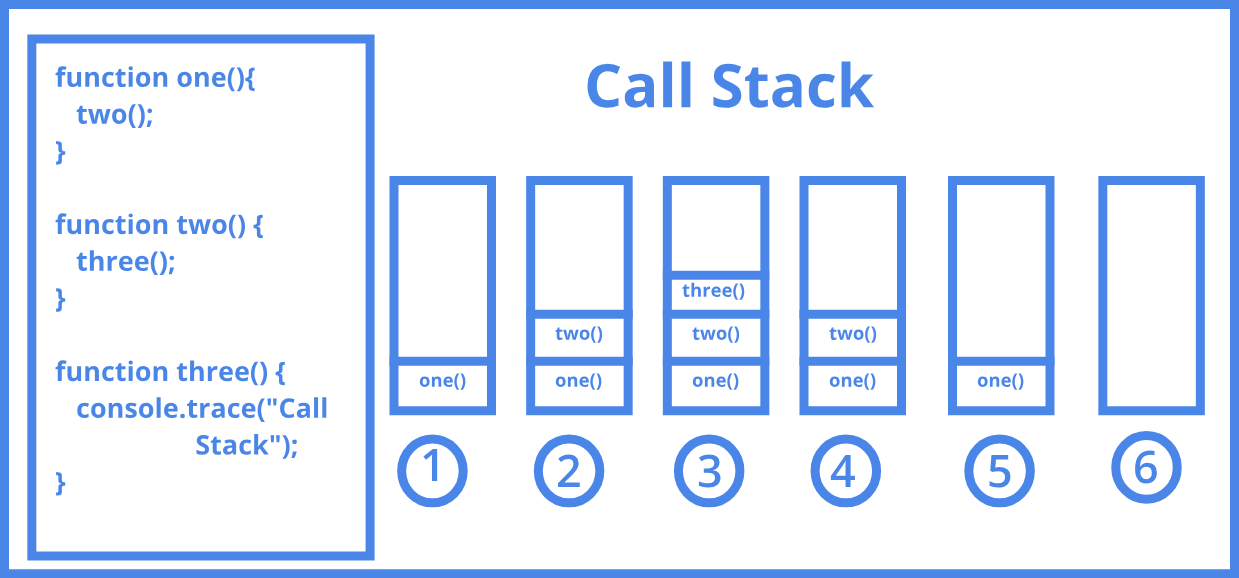
A call stack is a mechanism for an interpreter (like the JavaScript interpreter in a web browser) to keep track of its place in a script that calls multiple functions — what function is currently being run and what functions are called from within that function, etc.
- When a script calls a function, the interpreter adds it to the call stack and then starts carrying out the function.
- Any functions that are called by that function are added to the call stack further up, and run where their calls are reached.
- When the current function is finished, the interpreter takes it off the stack and resumes execution where it left off in the last code listing.
- If the stack takes up more space than it had assigned to it, it results in a “stack overflow” error.
JavaScript error messages && debugging

Types of error messages:
-
Reference errors
-
Syntax errors
-
Range errors
-
Type errors
Tools to avoid runtime errors
-
quokka to evaluate your code as you type
-
eslint to make sure your style guide is consistency and it will grab you an error or two along the way and
-
For those of you looking to make JS a more strong typed experience you can check out stuff like TypeScript (like I said in a previous article, when learning I rather avoid libraries that abstract the core language so I wouldn’t recommend - - this last one when starting).