Flexbox and Templating:
Mustache is a logic-less template syntax. It can be used for HTML, config files, source code - anything. It works by expanding tags in a template using values provided in a hash or object.
Where to use mustache.js?
You can use mustache.js to render mustache templates anywhere you can use JavaScript. This includes web browsers, server-side environments such as Node.js, and CouchDB views.
It is often referred to as “logic-less” because there are no if statements, else clauses, or for loops. Instead, there are only tags. Some tags are replaced with a value, some nothing, and others a series of values.
Example:
Mustache.render(“Hello, ”, { name: “Sherlynn” });
// returns: Hello, Sherlynn
CSS Flexbox Layout Module
The Flexible Box Layout Module, makes it easier to design flexible responsive layout structure without using float or positioning.
The flex container properties are:
- flex-direction
- flex-wrap
- flex-flow
- justify-content
- align-items
- align-content
The flex-direction Property:
The flex-direction property defines in which direction the container wants to stack the flex items.
The flex-wrap Property:
The flex-wrap property specifies whether the flex items should wrap or not.
The examples below have 12 flex items, to better demonstrate the flex-wrap property.
The flex-flow Property
The flex-flow property is a shorthand property for setting both the flex-direction and flex-wrap properties.
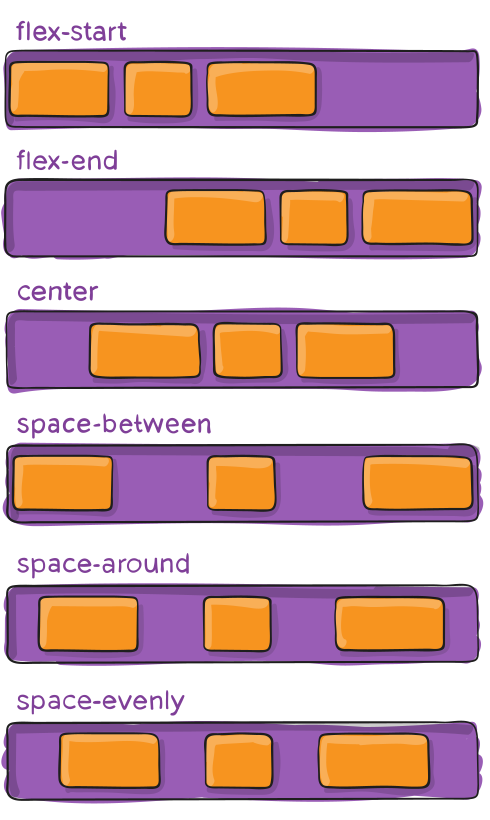
The justify-content Property
The justify-content property is used to align the flex items:
The align-items Property
The align-items property is used to align the flex items.
The align-content Property
The align-content property is used to align the flex lines.